Tuesday, 16 September 2014

Orion: Rationale and Details

Aim true.

This little guy is what I called Orion. This is my parent's computer and my secondary rig. I was wanting something I would be able to hook up to my TV and play a few games on from the comfort of my couch and my parents also needed a new computer. So I built this for them, and for myself. My brother even said "He's just building this so he can play on the TV." That was just the secondary option.

Before I begin, I wanna tell you my parents' previous specs that they got back in 2009. They bought a brand new Gateway from Future Shop. Really decent machine. It had an Intel Core2Quad Q6600 CPU, an ATI Radeon (Yes, ATI, before the times of AMD) HD 4650, 8GB of RAM, 1TB of HDD, and a measly 300W PSU. A year later I upgraded the GPU and PSU to an Nvidia GTX 500Ti and a 500W Cooler Master something, and played some games. And then it started to really get slow last year. The capacitors on the terrible Acer motherboard were starting to pop, so it was dying. So I did what any nerdy child would do and I put my money into buying them a new system. Let's get started.

CPU: AMD A8-6600k @3.9 Ghz
So I was going to use an A10-5700 from my own old Gateway, but sadly, while pulling off the heatsink, the CPU came out of the motherboard and bent a pin. One of the flaws of ZIF sockets. But, I bought an A8-6600k to replace it, which costed less than an A10-5800k. It's a quad core chip, unlocked, so gaming would be decent with it. I disabled the onboard graphics cause I had a GPU I could plop into the build, so the CPU runs fully by itself. It's a good chip for what we use it for, but it won't be doing any intense rendering or anything, not that anyone does that, anyway.

GPU: Club3D R7 265 2GB
I bought this card cause it was on sale and I was going to put it into a Mini-ITX rig, but since this replaced that rig, it went in here. It's a really good card, just slightly less powerful than my R9 270 in my rig, and can even run BF4 on ultra settings at 900p. Better than the PS4 (Yes, I had to jab at the consoles. Sorry.) It's also pretty silent as well, despite only having one fan. It can get loud after 50% fan speed, but if you mind the noise, you can use MSI Afterburner and lock it at less than that. It's a good little card, and really works well with the system.

Mobo: Gigabyte GA-F2A88XM-D3H
So I got this mobo since I couldn't use any of the previous ones. It was a good mobo that was available at NCIX when I went there to get a mobo, and it was on sale. I was going to get something cheaper, but it's for the parents, so I splurged a little bit. I hear good things about Gigabyte boards, so I figured the durability would be good for them. I don't wanna have to update this in 3 or 4 years. It was on sale, it's got the best chipset on the FM2+ platform, and it looks really cool inside the all black rig.

RAM: 8GB of Kingston whatever
It was in the old Gateway. The crappy this is that it's over 4 DIMMs, so there's not a lot of room for expansion, as it takes up all the slots. I don't think I or my parents need more than 8GB though. Not now, anyway.

HDD: 1TB Seagate
It was also in the old Gateway, so we just used it. Simple, efficient, and surprisingly fast. It boots from a cold start to the desktop in about 30 seconds.

PSU: Cooler Master 500W Something
I don't know the name of this Cooler Master PSU, but it hasn't blown up on us yet. It's not crazy efficient, but I think it's 80+, cause it hasn't caused our electric bill to explode. It's a decent PSU, but couldn't tell you what kind it was without rummaging through a bunch of old boxes.

Case: Cooler Master N200
I really love this case. It's a simple mATX case, but man is it amazing to work in. It has so much room! Oh, and it's cable management options could rival a full size ATX case. There's a ton of space to work with, and the only issue is that routing cables behind the motherboard tray makes the side panel a little hard to close, but doesn't effect anything else. There is ample room in here, and it was really cheap, something like $45. So if you want an mATX build, I really like this case, even over the Core 1000 from Fractal.

So, there you have it. My parents' build, aka Orion. It was really fun building this, and I even got to teach my dad some stuff about computers. Don't think he retained anything, but it was fun.

Thanks for reading, happy gaming.

Friday, 12 September 2014

Destiny Review: Jack of all Trades, Master of None

A lot of promise. 

I love Bungie. I've loved them since I was 12. And that's probably why I'm so let down by Destiny. I got hyped up for this game for a while. And while there are good aspects, the game falls short in just as many. It's a jack of all trades, but a master of none.

The game is setup as an open world, breathing shooter adventure game. The exploration is fun, and seeing where you can get to is very interesting. It's got a bit of Borderlands in it, with loot and chests strewn around the worlds. You're given a fun vehicle to whip around the world in, and makes everything faster, but large. The gunplay is good too, with each weapon variant feeling different, even if they're in the same class.

Level 8 looks like this.
Furthermore, you get to create your own character, customizing their facial features to see in cutscenes. It's also good that our characters talk, because if they didn't, what's the point of making the game an open world game? Cutscenes look great and are beautifully rendered, but too much of the story is told through them instead of through gameplay. The main City is really interesting, with different merchants and stuff throughout, but that's about it. You can't talk to the random inhabitants in the world, which makes it seem a little lifeless.

Despite all this, the game falls short in some aspects. Exploration is tethered a bit during story missions, making them feel linear. The only true way to explore the worlds is through patrols, which is a good option. Strike missions don't really add to the story though, other than "weakening" the Darkness and the various forces. Some of the loot is kind of crappy too, with some giving seemingly pointless items. Gold chests give rare items, but they're very hard to find without a guide or wiki.

While gunplay is good, some weapons don't act like you would think. Auto rifles usually bounce far too much making them hard to control and impracticle when you can get a one hit kill on enemies with a handcannon. Sniper rifles don't feel like a good option over fusion rifles because most combat is up close, and sniper rifles do less damage to bosses than fusion rifles do, even from far range. Power ammo, for LMGs and rocket launchers isn't dropped, making you not want to use them unless you absolutely have to.

The multiplayer makes me want to be alone.
And then there's the multiplayer. The Crucible only has 4 permanent modes, with Bungie switching and adding modes later on. But my main gripes with the multiplayer are the netcode and the balancing. The netcode is awful, even worse than Battlefield 4's. Coming from the team that brought us Halo, this shouldn't be forgiven, especially if the multiplayer is going to be competitive.

Furthermore, balancing is a major issue. Putting level 10 players into a game with level 20s is not fair for them, and makes multiplayer frustratingly hard. The guns are also unbalanced, with primary weapons having no chance against fusion rifles and shotguns in the enclosed spaces, and sniper rifles and LMGs outside. Also, jumping is once again a tactic, which just makes me angry. People in Halo 4 don't jump as much as people in Destiny.

So Destiny feels rather disappointing. While it's gameplay can arguably bring you back for more, the multiplayer definitely won't. If you have friends to play with, the game is a lot more fun, but playing alone is fun if you don't care about a story. The game has a lot to offer, but while it tries pleasing everyone, it doesn't really please anyone.

Destiny gets a 7/10.

Wednesday, 10 September 2014

Destiny: Full Game Impressions

Pretty fly for a tough guy

So, I went to the midnight launch for Destiny. Had it come out on PC, I wouldn't have needed to stand in line for an hour and a half. Don't go to midnight launches for any game, just wait a few more hours and go in the morning, but I digress.

I've spent 2 days playing the game, and it is a lot of fun. I expect nothing less from Bungie, cause they make good games. I'm a huge Halo fan, despite my current PC leanings. So, I started writing down some first impressions while playing my now level 11 Titan.

This isn't a full review. It's a few impressions I've had, and discuss the singleplayer/co-op and The Crucible (PvP).

Pros:
- The exploration is very good, open, and enjoyable.
- Finding chests is awesome.
- The Sparrow feels and sounds amazing, even through TV speakers.
- The guns are hit and mix. Some weapons feel better than others, but that might be based on the classes.
- Characters can look really cool, and customization is relatively deep.
- The cutscenes look beautifully rendered.
- The City is pretty cool.
- The backstory is as epic as it can be without sounding stupid.
- Every story mission makes you feel like you're actually moving toward a goal, even if you can take your sweet time.
- When you get matched up with people of equal level, the multiplayer is pretty fun. Not Halo fun, but pretty fun.
- The game looks really good, even on the Xbox One. 
- The highest rank you can get to is 26.

Cons:
- The only true way to explore is to go on designated patrols.
- Strike missions don't add to the story or even back story; they make you fight through hordes, kill boss, end mission.
- Finding chests is great! Finding out what's in them is not; they're rather underwhelming except for the gold chests which are hidden well.
- The Sparrow doesn't have guns, so I can't re-enact the forest scene from Return of the Jedi.
- The guns feel a bit strange some times. 
- You can customize your armour, but you have to find a merchant to do it. The game doesn't inform you of this.
- The Multiplayer has more issues than Battlefield 4. You thought that netcode was bad? Oh, man, Bungie dropped the ball.
- The Matchmaking is more unbalanced than Titanfall, and you get level 6 players going against level 15-20. 
- Jumping is a tactic again. Hurray.
- Playing alone can get boring after a couple hours.
- You can't talk to people outside of your Fireteam, which makes communicating worthless. This is even in the PvP, where you need to communicate to win.
- The highest rank you can get to is 26.

Again, this is not the full review. That will happen next week or the week after. It is an interesting game with a lot to offer, but I feel that the multiplayer not being as good as you would expect from a Bungie game will hamper it a bit. The story is there, the gameplay is like almost every other shooter, but there are annoying things that make the game frustrating. Hopefully Bungie can fix the game in a later patch, and hopefully the single player can keep me occupied until then.

See you guys next week.

Wednesday, 3 September 2014

Why Trying to Persecute The "Fappening" Hackers Would be an Exercise in Futility

Even me.

For all the regular tech savvie people, you know what I'm going to say. This blog isn't for you, but please feel free to read along with us anyway.

In case you haven't heard, a large amount of celebrity nudes have been leaked onto the internet through 4chan. It has been deemed "The Fappening" by the internet and reddit. This has caused some of the celebrities involved to pursue legal action. I'm here to tell them and the news outlets why that is very stupid and would be the biggest waste of resources, time, and money since the Iraq war (Ooooh, topical!).

I'm gonna walk you through how these hackers got a hold of these images, and explain why tracking them down would be very hard. There's a couple simple reasons as to why this is. Let's go through them.

1. Virtual Private Networks aka VPNs
For those who don't know, a VPN allows someone to route their internet connection through a different IP address somewhere else on the planet. They mask where their information is going so when their Internet Service Provider tries to check on them, all they see is packets of information. They can't see where the user is going, what sites they're on, etc. This is one of the ways you can get American Netflix while in Australia. They're also used for some shifty practices, such as hacking.

The people or person who hacked iCloud's servers could have been using a VPN. That means that if they were to try and trace the original 4chan post back to an IP address, it would end up being traced back to where the user chose to place their IP. This means that the feds would bust down a door in San Jose, California, when really the guy is in Szechuan province, China. There are a few other ways the hacker or 4chan poster could evade persecution, however.

2. Proxy servers
Proxy servers a really hard to use. Essentially, it's a server that sits between you and the website you want to access. In the case of the leaks, the user accessed 4chan. So let's use that. The user has all these leaked photos. He sets up his proxy server, and hops onto 4chan. As he presses enter and loads up 4chan, the proxy server erases his IP address and substitutes it for its own. That means that when the feds go to check the IP address of the 4chan user who posted the pictures, they won't find their actual IP address, just the one the proxy server gave. This essentially stops any searching dead, and puts a wall up between the user and the people wanting to find them.

Proxy servers are usually used by people who want YOUR information, so be weary of any "Open" proxies. Most people know better, but a proxy is usually never abandoned. Just waiting.

However, none of these would actually be very useful without one main factor: Encryption.

Encryption is one of the major weapons hackers and everyday users of the internet should use at all times. It makes sure people can't access your information. A standard 128-bit encryption can take even the most sophisticated programs years to break, with conservative estimates starting at 30,000 years. 256-bit encryption could take millions of years, but it's not as adopted yet. Everything the hacker did would need to be encrypted. From using their VPN, and encrypting their Proxies. This would be very important to make sure they wouldn't get caught, and would increase the trouble for anyone looking to persecute them.

But let us get one thing straight: No one should hack for exploitative purposes. Hacking isn't something to be taken lightly. It is a criminal offense in every country with a computer network, and is a breach of privacy, especially in this manner. The Fappening is a huge breach of privacy and trust if it truly is the doings of a hacker or a group of hackers. Never hack to become popular. Hack because it can change the world for the better. And no, helping people "have fun" at the expense of other people is not a good reason.

There are black hatters and there are white hatters. Maybe we'll talk about them some other time.

Until then, be safe on the internet, and always encrypt. A great way to be safe is to use a VPN, and I recommend Private Internet Access. I use it, and I get American Netflix at really face speeds! Hotspot Shield and OpenVPN are also good recommendations. Have a good one.


Friday, 22 August 2014

Valkyrie: Rationale and Details

A Very Dusty Valkyrie

So, I've had my current build for about 6 months, and have never actually written about it. So, I decided that with all the free time on my hands (I was recently fired), I might as well tell everyone about Valkyrie.

Valkyrie is definitely my idea of a budget computer capable of gaming better than a console. It has a quad-core CPU, An R9 270 GPU, 8GB of RAM, 1TB of HDD, and an Asus M5A97 LE R2.0 Mobo. And when I first built this, a lot of people asked me "Why'd you get this instead of that?" So that is what this post is about. Rationale.

Let's start with the CPU, a basic FX-4300. Why'd I get this instead of an FX-8350 or i5 of some sort? Well, for a few reasons. 1. It was cheap. I got it for $110 bucks after shipping and taxes. That's a really good deal. 2. It is unlocked and easy to overclock and doesn't run as hot as an 8 core AMD. I can slap a Hyper 212 Evo on and get up to 4.5GHz easy. That will come soon. 3. It won't bottleneck or be bottlenecked with other components. The GPU mixed with this is perfect, and neither of them are holding the other back.

Next, the GPU. I got an Asus R9 270 because, like the FX-4300, it was cheap. I bought it back when AMD GPUs were super expensive because of the Bitcoin miners, but you can get R9 270s for as low as $150. It is an amazing card for the price, and I think it will dominate the sub-$200 area for a long time.

I went with 8GB of RAM because that is what was in my previous computer. I just switched it over and saved a few bucks. It's 1333Mhz RAM, so it's nothing stupid fast, but it will allow me to play games well, cause it's 8GB. I still have 2 open DIMM slots, so upgrading in the future won't be a problem.

My Hard drive is also like the RAM, just swapped it out. I will be putting another TB or 2 into the rig later, when I get the money.

I went with an Asus mobo because I know they're reliable. It was about $100, and can really push the overclocking when needed. It doesn't have heatsinks over the MOSFETs or capacitors, but I have enough air going over the mobo to keep them cooled.

A lot of people have asked me what case I use. I'm not a major case snob, so I went with the cheapest ATX case I could find that had what I needed. Front intake, bottom mounted PSU, blue. That's all. This case is from LEPATEK, and I did a review of it when I got it, so check that out here.

My PSU is a Corsair CX500M. It powers the comp perfectly, and still allows me to upgrade because it has 2 6+2 PCIe connectors, so when I upgrade to an R9 280 or something, I'll have the juice.

So that's my current build. Not super powerful, not super weak. It's an insane budget build, and plays almost every game at high settings at 1080p at 50+ FPS. Mainly cause of the graphics card.

Thanks for reading, and I hope to see you soon.

Thursday, 19 June 2014

Steam Summer Sale: How to Get The Most From It

In GabeN we trust

So, the Steam Summer is inevitably going to happen soon (Maybe even today). So, I have a few tips on how to get the most bang for your buck and still being able to afford food for your gaming marathons.

1. Budget yourself
In my opinion, the easiest way to budget yourself during a Steam sale is to go out and buy a prepaid card. Go to an EBgames, a Gamestop, etc., and buy whatever is the most affordable for you. You can also put money right onto your Steam wallet as well. This way, you never spend money you don't already have, and you have to choose wisely and be patient for games you want. Even $20 can go a long way during the summer sale.

2. Only Buy Games You Want
This one is simple. Don't buy games that don't interest you. You don't need a game just because it's 80% off. You should only buy games that you know you would play, or have been waiting to go on sale for a while. Then buy them.

3. 66% or higher
Another good way to keep yourself on budget is to go after games only when they are 66% off or higher. AAA titles that have been out for a year or two (Bioshock, Tomb Raider, etc.) usually get that high, and Indie titles can go for 80% some times. From my experience, huge games like Call of Duty and such don't go above 25%, so unless you are desperate for the latest Call of Duty, it's not recommended.

4. Watch the Flash Sales
You need to look at the flash sales every 8 hours. These games can give you amazing deals, but remember rule 2.

5. Don't waste your entire budget in the first three days
This sale is going to last 12 days. Do not think that a game won't get a greater discount later in the sale.

I hope you guys use these tips and get as much for your money as possible. Steam Sales are crazy times, so hopefully the Valve servers can handle the massive surge of users.

Happy gaming, and happy spending.

Wednesday, 4 June 2014

Mini ITX Gaming Build $600

Tiny Powerhouse.

Hey guys, today I'm going to bring you what I think is the most affordable mITX build that doesn't compromise anywhere. For those who don't know, mITX is a very small form factor, designed to have as small of a footprint as possible. Mini ITX cases come in many different appearances, but they are all supposed to save as much room as possible without having to remove major components. So let's get to the components and check it out.

CPU: AMD Athlon X4 760k
The AMD Athlon line is actually a really affordable line of CPUs. Everyone knows the APU line from them. The Athlon X line is the same CPUs from the APU line, but without the GPU on the dye. This allows the cores to be unlocked and overclockable, which is a really good thing with the mobo and CPU cooler we're using.

CPU Cooler: Cooler Master Seidon 120V
The Cooler Master case we're using is designed to be optimally configured with an all in one water cooling loop. So, why not use the loop from the same company? This 120mm heatsink loop will help keep the CPU cool under load and will increase the overclocking ability by reducing the temperatures. With this loop, we should easily be able to get an overclock of around 4.2-4.5GHz per core without much worry.

Mobo: MSI A88XI AC
This MSI mobo comes with all the fixings. It has the best FM2+ chipset available right now, supports 16GB of RAM, onboard WiFi adapter, and a PCIe 3.0 x16 slot for full GPU capability. It is a really good case, and even saves some money since you don't need to buy another wireless adapter or anything for the system. It even supports USB 3.0.

GPU: XFX R9 270 DD
Surprisingly, this small form factor case can hold full length graphics cards, even long ones such as the Radeon 7990 which is one of the biggest cards on the market would fit in this case. So for our build, we're going to use an XFX R9 270 DD (Double Dissipation. Not... you know). I love R9 270s, so you can easily swap the manufacturer around if you wanted, but the XFX card with two fans is just ten dollars more than the Club3D card with one fan. If it costs $10 for better cooling for your graphics card, buy it. You don't see a huge difference between two fan designs, though, so keep that in mind. With this card, you'll be running games at 1080p with no problem on high settings, including Battlefield 4, Titanfall, and Bioshock.

RAM: Team Elite 8GB
We'll go with the cheapest 8GB of RAM we can get. RAM doesn't really change depending on the manufacturer, so one stick of 8GB will allow us to upgrade to 16GB when needed.

HDD/SSD: Seagate Barracuda 1TB and/or Crucial M500 120GB
Since this is a small case, there are two choices; you can put a HDD for storage capacity, or you can put in an SSD for boot speed and faster loading times. If you go with the latter, it's highly recommend that you get an external HDD or go with a cheaper SSD and get an internal HDD as well. SSDs have limited amounts of writes, so saving a lot of files will cause it to die after a year, or possibly sooner. Both are great choices depending on your needs.

PSU: Fractal Design Integra R2 500W
Fractal makes some great stuff, so for this build, we'll use their lower end line of PSUs. This will power your build completely as well as keep quiet. If you want modular, I recommend the CX500M from Corsair. It's in my system and makes cable management a cinch, but the Integra is a great product for this build.

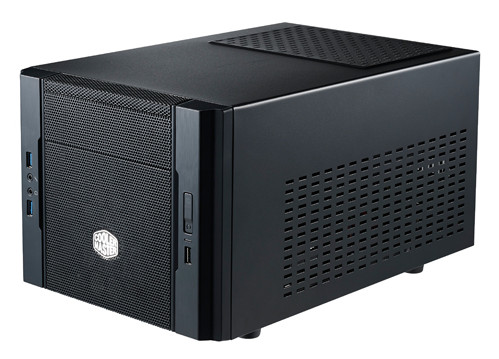
Case: Cooler Master Elite 130
Here's the case that is the main talking point for this build. While there are other cases that have the same functionality from Fractal and Bitfenix, Cooler Master might be ahead of them in terms of one major thing for us budget builders: cost. This case is just $50, which is a major hit to it's biggest rival, the Node 804 from Fractal, which comes in at $89. This is definitely my go-to case for mITX, and it should suit anyone well for a space conscious PC build.


Total cost (PCPP): $619.39

For $620, you get a small form factor build with a full gaming graphics card and simple watercooling. This makes for a perfect console replacement or living room gaming machine, and should be quiet and versatile for it's use.

Happy gaming.

Tuesday, 25 March 2014

Been a long time: $600 Build

Hey guys, guess who's back to writing. Today, we're gonna go right into a nice modest build, similar to the one I'm using, but actually even more powerful. Let's dive in.

CPU: AMD FX-6300
We're gonna start with a great CPU for any budget rig. I wish I lived in the US because this CPU is a still at the Amazon price of $109.99. If you're thinking of getting a new CPU for your current AM3 or AM3+ motherboard, I highly recommend getting this. Just make sure your mobo is compatible. Six cores, amazing power in game, it's a steal.

Mobo: ASUS M5A97 R2.0
Another reason I wish Canada's computer market wasn't taking a dump. I have the little brother to this Mobo, the LE R2.0, and the standard comes with something mine doesn't; a heatsink over the capacitors. Not only will this increase the life of your mobo, but when you're cleaning your rig, you don't need to be worried about damaging the capacitors. And at the offered price, it's a great motherboard.

GPU: CLUB3D Radeon R9 270
Yea, I know, it's an R9 270 again, but at least it's not an ASUS card, right? CLUB3D has a really nice line of cards, and even though it's only a single fan card, it'll still be great when gaming. I think CLUB3D will be a major player in the next few years, because unlike other brands, they aren't being eaten up by the Bitcoin buttholes.

RAM: Kingston 8GB DDR3
It's 8GB of DDR3. Can't ask for anything else in this day and age. If you want or need more for video editing, it's really cheap to get 16GB, but for gaming, 8GB is all you need.

HDD: Seagate Barracuda 1TB
Pretty much what you get in any store bought PC that isn't a Toshiba. They're sturdy, pretty fast, and have a lot of space.

PSU: Corsair CX500M
Hey look, another part from my rig. When I was upgrading my parents' computer 3 years ago, I hated the fact that there were so many unused cables dangling around inside. So with this semi-modular power supply, I got rid of that hassle, increased my airflow, and made the inside of my case look better. Get a semi-modular power supply, and you will be a happy chicken. I don't know where that came from.

Case: Cougar Solution
I like Cougar. They've been making fans and stuff for years, and now they're making cases. The case quality is really good, and almost all of them offer great potential for air and even water cooling with small rads. I recommend the Cougar Solution for people who want a cool but not outrageous looking case, but if you want something different, that's your prerogative.

PCPP Link: http://pcpartpicker.com/p/3gvSp
Cost on PCPP: $619.30

So, there you have it. The first rig in a VERY long time. I hope you enjoyed it.

Game recommendation: Saints Row IV
Just go play this game.

Thursday, 13 February 2014

Airflow: Great Temps Without Water


If you guys know anything about me, you know that I really stress good airflow. I always recommend cases with front vents, I try to recommend good CPU coolers when I put them on builds, and I like putting as many fans on as possible.

I think good airflow can actually cool your rig just as good as water cooling can with the right setup. A great example of this is my latest rig. I'm getting amazing temperatures on all of my components. My temperatures on HWMonitor are thus:
CPU- 35C (97F)
Mainboard - 30C (86F)
HDD - 31C (87F)
GPU - 29C (84F)

My system fans are running at around 1100RPM, dipping down to 900 when system is relaxed. My CPU fan is running at 2500RPM. The fans on my Graphics card are running at 1100RPM, or 25% of the fastest they could go.  Comparing these to my previous APU computer, the values for most are actually fractions. My CPU in my old build was running about 50C from at 2500RPM. My Mainboard was around 40-45C, my HDD was about 40C and my GPU was averaging 60C on a medium load.

The reason my temperatures are so different now is because I have a fan blowing cold air in from the front, over the components, and the hot air comes out the back. I'm going to be getting a bigger fan for the back, a fan for the side panel, and another fan for the front. Hopefully I can get everything below 30C then.

The great thing about this is the cost. The fans don't need to cost more than $10, or so, and getting a fan splitter will cost a similar amount. Instead of buying an $80 AiO water cooling kit that just cools one component, I highly recommend just getting a lot of fans and running them at 1000RPM or so. Even lower if you have 3 or more.

Don't spend money where you don't have to. Be smart with your budgets.

Happy gaming.

Wednesday, 12 February 2014

LEPA LPC307 Case Overview


Hey everyone, today we're looking at the chassis for my new build, the LEPA LPC307B. This case was pretty much the cheapest ATX case I could find, but it had everything I needed for the price. Lepatek is a German company who have been making Power Supplies and Fans for ages, but their 300 series cases are their first foray into chassis.


The case features front vented area to put fans, one USB3 port, one USB2 port, Audio, Reset and power buttons and two 5.25" drive bays. The construction could be better however, since the front cover is plastic while the rest of the case is metal. This could be to make it easier to take off, but I would have liked them to at least put metal accents or something to strengthen it.


When you pop off the front panel, you can see it's held in by plastic pins, making it easy to pull off. However, these look like they could break easily, so it would have been a smart choice to use metal here. The cables to the front I/O are neatly strung together near the panel and can be move around because of the long length of each of them.


When we take off the front panel, you can see that there is ample room for drive bays as well as holes for fan installation. You can either put two 120mm fans in the front or one 140mm fan. I don't think you would be able to put even a small radiator, so this is not a good choice for water cooling enthusiasts.


Looking at the side without the panel, we see a really big cutout behind where the CPU goes, allowing for easy bracket mounting. We also see holes for cable management, and a rear fan for exhaust. Despite the cutouts, the chassis feels quite sturdy, even though it is very lightweight. The small 2.5" drive area can be removed to improve airflow if needed, but the tight area is held in place by four screws, which could have been made easier to access with simple sliding drive trays. We also see an air filter for the PSU that comes with mesh to keep dust out.


Around back, we can see the read I/O area for the motherboard as well as the PSU mounting area and the expansion ports. This case could theoretically hold 3 graphics cards, or 6 expansion cards, but I wouldn't recommend it because there wouldn't be good airflow. The expansion slots are only removeable once and can't be put back, so card placement and planning is required. We also see near the fan two holes for water cooling tubes, in case you have a water cooler outside of your system. Once again though, one time use. They can also be covered up if you want to make sure dust doesn't get inside.


We we go around to the other side of the case we see the emphasis of the large motherboard cutout. Despite not appearing to have a lot of room, the side panels are concaved to make cable management a lot easier, as well as add fans on the other side.

Overall, the case seems like a good first effort, especially at the price I purchased it. The pluses include a sturdy frame, nice holes, expandability, and decent looks.

The minuses come from the lack of metal in the front panel, not much room for water cooling, screws were sliding mechanisms would work better, and the lack of reusable expansion slot covers.

However, I do like this case because of the good price I got for it. If you are a first time builder, want good airflow and nice expansion options, this might be a good case for you. If you are a seasoned building vet, I really don't recommend this, and would point you towards something more enthusiast class.

I'm giving this case a 6/10, and I hope Lepatek can improve in the years to come.

Happy gaming and happy building.

Tuesday, 11 February 2014

NewEgg Deals!

Newegg has a bunch of the deals on components, a lot of them really good deals for budget builds. So here are my favourites, with the promo codes.

Athlon X4 760k - EMCPHWW32
So the Athlon X4 series are some awesome quadcores for budget builds, mainly cause they're like the Richland APUs without the GPUs. So if you want a good CPU, either for a replacement or for a new build, this is a great place to start, especially at this price.

Corsair CX430
Another great component for a budget build, especially with a low power card. Anything less than a 7850/GTX670, you'll be fine. I really like Corsair PSUs, because they're really good quality for the cost. Plus, they have 3 year warranties, and they're all 80+ Bronze. Get them if you need a new PSU.

Rosewill Challenger Gaming Case - EMCPHWW26
I love Rosewill cases. They look good, and have great airflow, and come with everything that I like. Bottom PSU, 5 fan areas, and all the front ports you need. At this price, this Challenger is really good.

Borderlands 2 and Borderlands: GOTY
Want two games for the price of less than one? Seriously, this is the most addicting game franchise ever. You get all the DLC for the first game, plus the main game from Borderlands 2. Try them both, and you can't go wrong at this price.

These are all awesome components, and a game to tide you over. Unfortunately, no graphics cards or anything. Try finding one on sale, it'll be great for a budget build. I recommend a GTX 650Ti or a 7790, both of which are around $150.

Happy gaming.

Sunday, 2 February 2014

Ultra Options! $700-800


Today is all about options. Since it's Superbowl Sunday, we're gonna be calling a few audibles ourselves today. So for almost every component, I'm gonna give you a few options that will still have you sitting at or below $800. This way, you can get a bit more of a basis as to where you can spend your moolah. Let's get started.

CPU: AMD FX-8320 or FX-8350
Now, these CPUs are very similar. Eight cores, AMD chips, but there are some differences. The biggest one is the frequency. The 8320 runs at 3.5GHz with a boost to 4.0GHz. The 8350 starts at 4.0GHz and boosts to 4.2GHz. This allows the 8350 to be overclocked easier to high frequencies, but at a high price. That being the price, of course. The 8320 is about $60 less depending on where you buy it from. That's a really good price for an eight core, but both of these get my recommendation. The 8320 is for people who want more power while on a budget, and the 8350 is for overclockers galore.

CPU Cooler: Cooler Master Hyper TX3 or Hyper 212 EVO
These coolers offer you some serious cooling for your buck. The TX3 is $10 cheaper, but that's because it utilizes the AMD motherboard's built in heatsink mount. The Hyper 212 EVO uses Cooler Master's own mounting bracket, which will give it better stability. The decision is mostly if you want to have a good basic cooler without much tampering, or a better cooler where you have to install a lot for yourself.

Motherboard: ASUS M5A97 R2.0
Now I'm not really going to give another option for the mobo because at this price point, there's not much different between them all. I chose this one because it is a 970 Northbridge for decent overclocking and also comes with a heatsink over capacitors left of the CPU. I like that a lot, cause it adds to the longevity of the board, and protects components. You could go with a 990 board, but that's your choice.

GPU: XFX Radeon 7870 2GB or ASUS R9 270 2GB
The XFX is better than the 270 at stock, but when overclocked, the two cards get closer to each other. The 270 may be harder to find, but if you're an ASUS fanboy (like me), you may want to get the ASUS, since it's the DirectCUII. Either way, these cards are great and will kick the crap out of any game you throw at them.

RAM: Crucial Ballistix 8GB DDR3
What else can I say about this RAM that I haven't before? Just buy it when it's cheap, honestly. You'll thank me and yourself.

HDD: Seagate Barracuda 1TB
It's Seagate. They make good stuff. And at the price listed, it's a steal. Seriously, buy it if you just want more space in your current rig.

Optional SSD: Crucial M500 120GB
This is a nice little SSD, so if you want to improve performance, I recommend it. At the PCPP price, it's really good too. It'll improve your boot times and your loading times if you have your major games like Battlefield and Skyrim on it, so if you're a speedfreak, get one. If the extra seconds don't mean much to you, you'll have no problem with just an HDD.

PSU: Corsair CX600M
I have one. It's really nice. Deadly silent. And it's modular. So yea. Get it. Now.

Case: Cougar Volant or Fractal Design Core 3000
If you want a crazy low-rider of a case, get the Cougar Volant. It's pretty cool looking. If you want minimalist design and love the Swedes, get the Fractal Design Core 3000. If you don't like either, get your own case. It's the most subjective piece of the rig.

Optional: Windows 8.1
If you get the cheaper components listed, you'll have enough to get a genuine Windows. I recommend Windows 8.1 since this is a gaming rig. Most games actually run better on Windows 8 because it uses less RAM than Windows 7. But, it's all up to you.

I'm not going to list price because there are so many variables, but you can always change the PCPartPicker components and figure out your price.

I love this build no matter what options we use. Happy Superbowl for the Americans, and happy Football for any Europeans.

Happy gaming to all, though.

Game Recommendation: Game Dev Tycoon
It's essentially Game Dev Story from your phone on your computer. It's amazingly addicting. I've had it for about 4 days and have put 14 hours into it. If you like management games, or even if you like games like Civilization, I highly recommend it.

Tuesday, 28 January 2014

The Ultimate Gaming Rig: R9 290/X


The ultimate gaming rig is right. This build has been long awaited, mainly because it has taken so long for custom coolers to come out for the R9 290 and 290X. But, now that my favourite one is out, I think I should go ahead and config this rig for you guys. It is not a super budget conscious rig. This is for people who want to max out their games from the get go and just kill games like Battlefield 4, Crysis 3, and any other hard to max game. Let's get started.

CPU: Intel i5 3570k
We're gonna go Intel for this rig, mainly because the i5 in this case is the smart factor. You could get an FX-8350 for cheaper, but there aren't many games that utilize 8 physical cores yet. The Intel will allow you to push the system to the limits and kill any games that come into it's path. But, it's not the main component of this build.

GPU: Asus DirectCUII R9 290
So the R9 290X was spouted as the Titan killer, which it was... until the GTX 780Ti came out and killed everything. But, this is still a great card if you love AMD and want to utilize their future software components such as TrueAudio and Mantle API. I think that if the 50% boost that AMD is saying they'll get is true, this card will crush the 780Ti in any game that uses Mantle. Also, if you're into Cryptocurrency mining, there is really no better option than an aftermarket cooler on a 290X. If you have Amazon Prime, you get $100 off the 290.

Mobo: ASRock Extreme Z77 Extreme3
We'll go with a Z77 mobo for this build in case you want to overclock it. I do recommend a different CPU cooler though, cause the stock Intel cooler will not cut the slack. But, this Mobo also comes with a lot of features. It supports SLI/Crossfire, has two PCI-E 3.0 slots and one PCI-E 2.0 so you may get triple SLI if you wanted, though I would never recommend that. This is a great mobo, especially for $100.

RAM: Crucial Ballistix Sport 8GB
So we'll go with single channel Ballistix RAM. You know how much I love this RAM if you just read my other builds. We'll go with a single channel for now because this board has the ability to upgrade it to 32GB if you wanted, so I'm saving you money by getting you a single channel, believe it or not.

HDD: Western Digital RE3 1TB
1TB hard drive. Plenty for our games. Just go crazy.

PSU: Corsair CSM 750 80+ Gold
So we'll go with an 80+ Gold semi-modular power supply for this rig. This will save you a buttload on electricity, even more so since we're using lower power components, except the GPU. The semi-modular PSU will also allow us to easily manage our cables, even in a large case, since we only use what we need. I like Corsair PSUs, so they're highly recommended.

Case: Fractal Design Define R4
Fractal makes good cases. No two ways about it. The Define R4 is used by a lot of people, and I can see why. It's got a lot of space, it's clean looking, and it's got nice air flow. As always, get a case you like, but if you have no idea where to start, this is a nice position to start. (Promo code EMCPWHB37)

PCPP Cost: $1210.87

This is a really nice build, and if you have the money, I recommend it. But I think you should go with a 290 in the DirectCUII, because when overclocked, the 290 beats the 290X overclocked. And that's without non-reference cooler. So if you can find one, get a 290 for less than the 290X.

Happy gaming.

Thursday, 23 January 2014

$600 Build (Give or Take)


Alright everyone, today we're gonna do a $600-650 rig, give or take a few bucks here or there. This rig will give you amazing bang for your buck and really push the envelope when it comes to gaming. Also, if you're a budget conscious video encoder or something like that, this may also be a good option if you don't have a lot of money, cause it's a hecta-core, high speed machine. Let's get started.

CPU: AMD FX-6300
Now we're using a six core CPU for this rig because it gives us as much power we really need for gaming. AMD's eight core processors are great, but you won't need an eight core for gaming in a long time. Also, this CPU is $110 on Newegg, which is a steal.

Mobo: MSI 970A-G43
Here we have a really nice ATX mobo from MSI. The 970A-G43 comes with all the bells and whistles you would need, and even comes with Crossfire support, so if you want to, you can drop another GPU into the machine and get a nice boost in performance.

Graphics Card: XFX R9 270
While I don't really like or love XFX cards, mainly because they can get pretty loud, this card is at a really good price for our budget, and it was one of two that were available, haha. If you can find an Asus or MSI card for the same price or cheaper, I recommend it, but this will do just as good at stock, since it's all the same chipset.

RAM: GeIL Evo Veloce 8GB
We're gonna go with some nice GeIL Evo RAM for this rig. It's not too fast, so it won't significantly boost speeds in video encoding or anything, but it'd good enough for gaming. Also, it's really cheap, so you could easily upgrade to 16GB if you want after a month or so.

HDD: WD RE3 1TB HDD
We'll go with a 1TB Western Digital again. I was thinking of going SSD, but it wouldn't really fit amazingly well into our budget. But, this WD will do the job, and you will have plenty of storage for games and anything else your sick, weird mind might like.

PSU: CX500M
I have this Power supply. I love this power supply. Even with the standard cable kit, it's a lot less cables than a non-modular power supply. Use the cables you need, skip the ones you don't. That simple. I highly recommend it, especially with this case.

Case: DIYPC Solar-M1-G
Now, why do I recommend that PSU with this case? Because this case is huge! Well, apparently. It looks big. But this case will allow you to really stretch and hide the cables, making management better and increasing your airflow, and who doesn't like a cooler case?

Total Price (PCPP): $612.76 http://pcpartpicker.com/p/2G2xJ

This is a great mid-range budget build, and the power you'll get from it will do the job in nearly every game. It covers all the recommended settings for Battlefield 4, so you'll be playing on high at 1080p with great framerates. This is a good gamer sweet spot, so if you want a nice rig, build this.

Happy gaming.

Game recommendation: Nidhogg
This is a really fun little side-scroller sword fighting game. It's pretty much a gauntlet of enemies as you try to make it to the end of the level, but if you die, you just take over the body of the enemy that killed you and go the opposite way. It's really fun, and it's only $15. Go try it.

Sunday, 19 January 2014

Kill Your Console - $350-400 Gaming Rig


Hey guys, it's time for a new round of gaming PC builds. Today, we're gonna go for low-budget, entry level builders; people who don't want to play the latest games at the highest settings or who can't immediately build their dream rig.

Now, I'm gonna say this, cause a lot of people seem to think that PC gaming can't be better than consoles at this price. Well, here's the thing: Even if you can't max out the games at this price range, you have more variety, more versatility, and better functionality than a console gives you. The Xbox One and PS4 have about 40 or so games between them, probably less. The PC has over 2500 available on Steam and many other places, plus the myriad of free to play games online.

So, how about we get going with this build, shall we?

CPU: AMD A10-5800k
This is an APU, a CPU and GPU on the same chip. This saves us money because we aren't going to need to buy a graphics card and a separate CPU. Now, this won't play all the games at 1080p, but I will say that coupled with fast RAM, this will play a lot of fun, awesome looking games at good graphics at 1080p. It will even play Battlefield 3 at 1080p on low settings, or medium settings if you lower the resolution and fool around. Might even play Battlefield 4.

Motherboard: ASRock FM2A75 Pro4-M
That's a mouthful. This Mobo is pretty much a great motherboard for this rig. Not only does it allow RAM speeds up to 2400MHz, but it also is a micro-ATX motherboard with Crossfire support. That's really awesome, because it gives us a lot of space. I may even put this Mobo into a rig later. (Use PCPartPicker link)

RAM: G.Skill Ripjaws X Series 8GB @ 2400MHz
This is where the GPU on the APU will get all it's power from. Fast RAM means that the GPU can process things faster, so having this RAM will greatly increase framerates, especially at resolutions like 720p and 1080p. Again, you might not be able to make the game shine, but it will be great for in between upgrades.

HDD: Western Digital RE3 1TB
I have no idea what the RE3 stands for, but it's a 1TB drive for less than $60. That's great value, so get it.

PSU: Corsair CX500M
This PSU is really good for the money. Not only does it give ample space for future upgrades, but it is also semi-modular, which means we only use the cables we want. If you wanted to, you could even get a short cable kit to cut down more on cables, depending on your case. Also, I have one.

Case: Rosewill Ranger-M
As I said before, cases are very subjective, but I chose this case to showcase what I usually look for. You may like something else, but I like the front fan with the rear fan and all that for really good air flow. It doesn't have front USB3, but you can always change it if you want. Contact me if you want a different case, or go ask the people at the TekSyndicate forum, and they'll definitely give some input (expect many Fractal cases).

Total price (PCPartPicker): $401.87 (after discounts and shipping)

Future GPU Upgrade: HIS IceQ2 R7 260X or HIS IceQ2 R9 270
You will probably want to upgrade your system in the future, and the best upgrade for this is a new graphics card. Well, I have two options for you. If you want a decent machine for your money, get the R7 260X. It's at a great price right now, and is definitely my contender for "Mantle Baby" when Mantle starts getting implemented into games. If you have about $60 more to spend, I recommend the R9 270. Not only is this card better than the R9 270X when overclocked, but even with its stock settings it is an amazing card. I highly recommend it. (buy them from Newegg. They're cheaper than Amazon.)


So your base build is great, and after a few months of getting used to PC gaming, plop in a graphics card and run with the big dogs. I think this is a great machine for anyone looking to get into PC gaming, so if you are wondering what to do next gen, this is definitely an option.

Happy gaming.

Game recommendation: Humble Bundle Bohemia Interactive
Not just one game, you get 8 amazing games and the mod of the century in this bundle. From the makers of ArmA, they've partnered with Humble Bundle to bring their most beloved games together for charity, and you name your own price. I can't say for all the games, but the ArmA series is great, as it DayZ, and $6 for the ArmA games is well worth the price of admission, and you may even find a game you like in the others, a hidden gem of sorts. So buy the bundle, support some charities, and have fun.

Thursday, 16 January 2014

NewEgg Email Deals

It's been a while since I did some deal blogs, so I'm gonna give some good deals that are available over at Newegg. These range from components to barebone kits to everything that interests me or is a good deal.

AMD FX-8320 3.5GHz
So this Vishera CPU is at $140 after a promo code (EMCPWWD22). This is an amazing deal because it's an 8 core processor for less than $150. That's insane. Also, if you get good cooling, you can easily overclock it to 4.5 and get the equivalent to an 8350.

ASUS Radeon 7790 DirectCUII
This graphics card is amazing for the price. Just $100 after rebate. The 7790 has been rebranded to the R7 260x, which is my favourite mid-range graphics card. It's amazingly fast for the money, and can take on some heavy games. If you're building a budget rig, buy this card. Now.

ThermalTake SMART 750W PSU
The price of this PSU is nuts. After rebate, it's $60. For a 750W PSU, that's amazing. It isn't modular, so I don't recommend this unless you are really good with cable management, but I will recommend it if you need a Crossfire/SLI ready PSU. This will do the job, and it's 80+ Bronze.

MSI Z77A-G41
This is the cheapest Z77 Mobo, I think. If you're building an i5 or i7 system, you will definitely want this. $60 for an unlocked mobo? Perfection.

ASRock 970 Extreme3 R2.0
If you're building an AMD system, you can't go wrong with this. ASRock makes pretty okay stuff, but if you couple this Mobo with, say, an FX-8320, you'll do amazingly. Trust me.

AMD Trinity Barebones Kit
This is a really, really good deal. This Barebones gives you an A10-5800k, a Gigabyte A88X Mobo, 8GB of G.Skill RAM, a Powercolour Radeon 7870, a nice case, a good PSU, and 1TB of HDD space. All for the price of $600. Now, you could cut corners here or there, get a cheaper PSU, a 760k CPU, stuff like that, but this is a really good package for people who want to upgrade their system more down the line. I recommend it for any first time builders. Also, if you use the promo code EMCPWWD92, you'll get the mobo for even cheaper.

AMD A10-7850k and A10-7700k
If you're looking for the best possible APU system, these APUs are what you need. They will run games amazingly, and don't break the bank. If you want a low wattage, decent gaming comp, these are what you should buy. The 7850k can run Battlefield 4 at medium settings in 1080p. That's good. Also, use the promo code EMCPWWD222 and EMCPWWD223 on each APU respectively, and get $10 off.


These components will give you some awesome power, even if you're just upgrading an older system. I highly recommend them.

Happy gaming.

Monday, 13 January 2014

Titanfall 6v6: Why Is That a Problem?


People are really stupid when it comes to games. It was recently announced that Titanfall would only hold a maximum of twelve human players per match.

Apparently, the entire internet forgot about the videos that were shown of the game during E3. For one, the game is the prettiest freaking next-gen shooter I've seen (Watch Dogs and Witcher 3 are prettier). Another thing is that there are THIRTY-SIX other AI controlled enemies on the field. Oh, plus there's the possbility that almost all of those soldiers could call in giant, amazing looking mechs. There's a lot of stuff happening in a match.

Also, may I remind everyone that the max enemies you can get on the average military shooter is between 18 and 24. Battlefield 4 gets 64 players, but the maps in it get massive. Like, huge. Titanfall is supposed to be a smaller shooter, similar to CoD or Killzone. CoD's most popular game mode, Team Deathmatch, only allows *gasp* 6 vs 6!

Also, anyone remember how many players are in Gears of War's multiplayer? Well, let me remind you that it started out as 4 on 4, and then moved to 5 on 5 in the sequels, and they're some of the best multiplayer games today. Halo as well has 4 on 4, 6 on 6, or 8 on 8, depending on the size of the map and the game mode.

So people bitching about Titanfall being 6 humans against 6 humans with 18 AI on each team, you're stupid. Like, really stupid. You don't even realize why you're mad. Is it cause it's just the same as what you been getting for years? Okay, so you want change? Okay, how about a 128 on 128 game? Oh, that was made? Yea, it was wasn't it. Didn't do too well, did it? The servers were shut down too, huh?

The gaming community seriously doesn't even know what it wants. Like, at all. They want change, but not for it to be different. Man. Make up your minds!

Happy gaming.

Thursday, 9 January 2014

It Came! Asus R9 270 Overview

The box of greatness!

It is here! After an intense three days of waiting, the best budget graphics card finally arrived at my doorstep. This card looks awesome, and I can't wait to test it out when I get a more powerful PSU.

Dose heatpipes

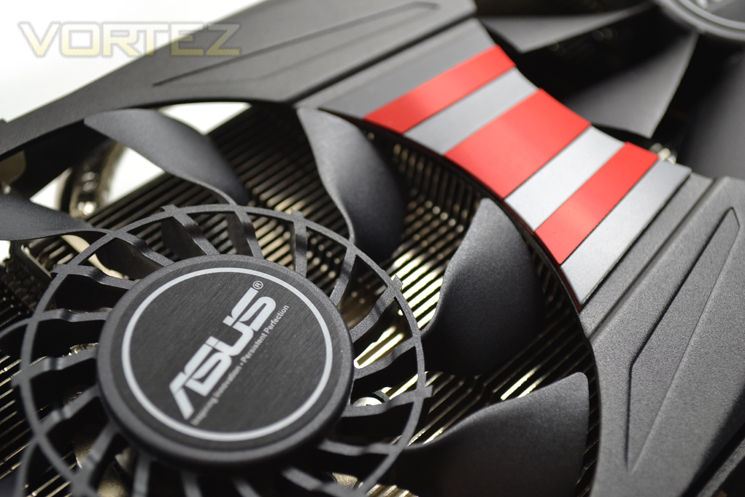
The card is the Direct CUII card from ASUS. This means that there are two heatpipes going from the GPU away and under the heatsink and fans, allowing for better cooling from the card. This means that the card is quieter as well, because the fans don't need to run as hard to keep the card cool under load.

Dose brackets (Pardon the booze. I should clean up.)

Being a dual bracket card, it's quite wide, but still small when you look at some of the competition. Also, the size of the card adds strength, so it won't flex or anything as much when installing, which is always a good thing.

Dat PCB

The specs of the card are such: 950MHz on the base Core clock with 975MHz boost clock, 2GB GDDR5 Memory, 5600MHz Memory clock (1400MHz effective). The card is overclocked by Asus themselves, which may or may not be good, but Asus does know what they are doing with their products. I'll probably benchmark this with both a reference clock speed, the Asus overclock, and an overclock to the best I can get. The card takes 1 6-pin PCIe connector with a TDP of 150W. It is also a PCI-e 3.0 card, so it is compatible with every motherboard for the foreseeable future.

Dose fans

This card being part of AMD's new R series means that it will be able to use Mantle when it is released for Battlefield 4 and Thief. This will push the card's effectiveness into overdrive, and really get the most out of the card. I can't wait to get the card installed and tell you guys how it works.

Happy gaming.

Monday, 6 January 2014

Ars Technica - Are You Insane?


So Ars Technica had an article talking about what companies may be on the edge of relevance in 2014. They have Radioshack, Blackberry, Zynga, and two others. Those three have been on the edge of relevance for the last 2 years, but the more interesting one of the other two is AMD (the other one was HTC). Now, they do say that AMD scored big by getting their processors in all three next-gen consoles, they go on to say that AMD is going to be overpowered by Intel and ARM processors. I say nay.

AMD is soon going to be who anyone making a computer on a budget goes to, especially for gaming. In 2014, this month as a matter of fact, AMD is releasing a new line of APUs. By the end of the year, anyone with a laptop that isn't a Mac will have an AMD APU in their computer. Why? Well, because the APUs are getting more powerful every year. And the next line of APUs will allow people to perform amazingly without breaking the bank.

A quad-core processor from AMD costs less than a dual core processor from Intel. That's just... true! And with APUs becoming the mainstream soon, AMD already has a large backing for them. AMD's numbers, despite what Ars Technica thinks, are constantly rising. And they will continue to make profit as they release better products. Ars Technica says their share dropped to a 16% in the PC space. I'm calling bullshit on that, because most people are turning to tablets, which many people are counting as PCs/laptop replacements. So yea, their percentage dropped now that tablets are in the mix, but take tablets ou and it's still a small gap between Intel and AMD.

AMD isn't going anywhere as long as they keep doing what they're doing. They've got money coming in constantly from the next-gen consoles and their new line of GPUs, and their APUs are about to make a huge dent in nVidia and Intel. You can quote me on this too, but I think AMD may actually end up being in the lead by 2016. Custom computer builders are seeing the benefits of 8 physical cores now, and AMD holds that entire section to itself if you want affordability. AMD will be the face of gaming in 2014, and the face of computers by 2016.

But that's just my opinion.

Saturday, 4 January 2014

Battlefield 4: A Fun Game, Despite the Bugs

Sitting in a hiding spot as I watch the flag change from American Red, White, and Blue to Chinese Red and Yellow, I see a tank moving down the hill. I spot it and wait for it to turn away, allowing me to launch an RPG right into the back of it. Suddenly, I see a friendly tank and two more engineers come storming down from Charlie and attack the tank with amazing fashion.

This is what DICE calls an “Only in Battlefield” moment and it’s true. I play a lot of shooters, and I really can’t think of any other game that has the best pacing for a game of this scale. Arma doesn’t come close because it’s too big and Halo has large maps, but not nearly as large or versatile. Nearly everything epic in scope that happens in Battlefield 4 could only really come from Battlefield 4.

But I think that maybe its downfall. Where Battlefield does everything right in great scope, it becomes certain that the bigger the game, the bigger the fall. And when a game is reviewed two months after a buggy, rough release, it’s hard to really enjoy it to the most.  Battlefield 4 is a great game… when it works.

So far, for me, it’s been good. But every so often, I get a map glitch, or a netcode screw up. The biggest thing for me was the inability to get into a game other than Team Deathmatch for 3 days. But maybe it’s the console and not the game itself. But there are problem across all systems. It sucks a lot, and takes away from the game, but it is inexcusable. Let’s just hope they don’t do the same thing next game (or with Battlefront!).
How to piss off a gamer 101

But enough doom and gloom and about the bad things. Let’s talk about the game. It is great fun. When you shoot something, you feel it. When you take an objective, you feel amazing. When you defend an objective, you feel unstoppable. Everything that happens in game is really fun. I’ve had the pleasure to play this on all major platforms (360/PS3, PS4, Xbox One, PC), and they are all just as fun as the other. The graphics look rougher on the 8 year old consoles of course, but the game is playable, and still does look good, just as good as Battlefield 3. And that’s good for the consoles. On the PC and next gen, the game looks amazingly good. It’s pretty. Really pretty. This game was brought to the pretty store, bought everything, and then went to the gorgeous shop and bought everything there. It looks amazing, and it adds to the game in this case.

But as I said earlier, the gameplay defines Battlefield. Large, open maps transition to confined spaces in an instant. Chaos and disorder is how every game starts out and the winner comes from who can rally their side to make the enemy more disordered. Constantly changing your objectives helps capture them quickly, and having everyone play their role properly will make you win. This is what makes Battlefield different.
Only in Battlefield

Balancing of the game is pretty good, too. I haven't really found a gun that is completely better than every other gun in the game, even with the myriad of attachments for each. The game seems to have been balanced decently from the start, which is definitely something good despite a rocky start.

Also, there’s a campaign that actually gives you stuff when you beat it! I know right? Incentive, thy name is Battlefield. The campaign is the typical “American’s gotta save the world” type story, but you actually seem like the soldiers do care about each other, despite the terribly corny dialogue. It was a decent campaign, though not as fun as Call of Duty Ghosts was. I will say that I will probably play the campaign again, because upon beating each of the three endings, you get different weapons for multiplayer, hence the incentive. I think it could have been better, but Battlefield has always just been a multiplayer centric game, as it is today.

To sum up, Battlefield 4 is a fun, immersive game that plays well. However, after 2 months of release, there are still many glitches, bugs, network code problems, and other issues. But, the game is in a playable state as of now, and will continue to get better as DICE works diligently on it. The game should be played on a next gen console or a PC that can play it on Medium settings at 1080p, but if you can only get the 360/PS3 version, I still recommend it.

The game gets an 8/10 on older hardware, but an 8.8/10 on anything that runs it on medium or better settings at 720p or higher.

360/PS3: 8/10

PC/PS4/One: 8.8/10

Happy gaming.